Physical Address
304 North Cardinal St.
Dorchester Center, MA 02124
Physical Address
304 North Cardinal St.
Dorchester Center, MA 02124

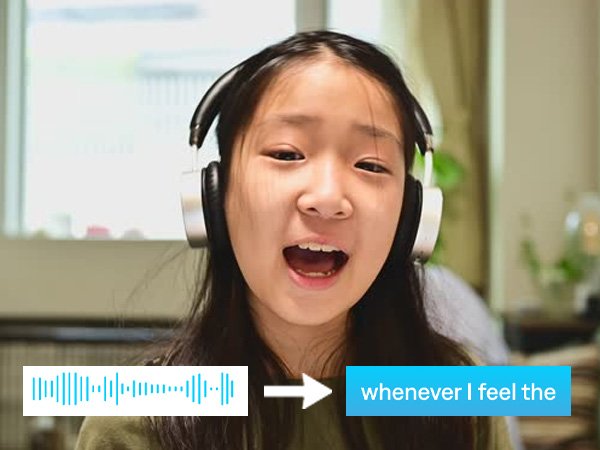
I have been using this tool for the last, from what I remember, over two years now. Very recently, I came to know that this is actually an AI tool. Initially, when I was using it, I was not sure whether it was an AI tool or just another SaaS product that I was using. The tool is called Veed, and the website is veed.io (V-E-E-D.io).
The beauty of this website is that, initially when I started using it two years ago, it was primarily for creating subtitles for my videos. But very recently I understood that there are multiple use cases for this product. Of course, you can create subtitles, but apart from that you can also create a brand kit, do dubbing, generate videos from text prompts, clip videos using AI, create AI avatars, and record videos.
Veed also lets you edit videos. It has AI avatars through which you can make videos faster with high-quality avatars. You can easily record yourself or your screen using the recording feature and share it with anyone you want.
Veed has also recently added a stock library that allows you to choose from over 2 million video and audio assets. These are royalty-free, so you can use them in your videos without worrying about copyright strikes.
You can also seamlessly work with your team using the collaboration feature, and you can host your videos using Veed’s embeddable video player.
There are multiple ways to edit a video in Veed. It allows you to magic-cut videos, translate them, remove backgrounds, and even remove a particular word from the video. Auto-subtitling is another major feature. As mentioned, you can also use AI voice cloning and create your own digital avatar, so you don’t necessarily have to be present in all your videos.
Talking about pricing, if you are based in India there are three plans. The Light plan is the basic plan and costs around ₹500 per month. The Pro plan costs approximately ₹1,200 per month. There is also an Enterprise plan where you can contact the Veed sales team to understand the pricing and features in detail. A table linked below will provide a detailed breakdown of the pricing and what each plan offers.
If you are looking to add music, subtitles, or text to your videos, convert audio to text, generate subtitles in multiple languages, change subtitle fonts and colors, compress videos, convert video formats, transcribe videos into text, or translate videos from one language to another, this is a tool you should consider.
It is budget-friendly, especially if you are based in India. If you are a freelancer or a one-person team, this tool will be very useful.
The AI Playground inside the Veed editor lets you use the software to its full potential. You can create product demos, brand story videos, explainer videos, product walkthroughs, app or feature explainers, and internal training content.
You can also create social media content for platforms like Instagram and TikTok. Apart from that, you can create paid ads, lifestyle videos for brand collaborations, and action or trailer-style clips to grab audience attention.
There are many ways you can use this tool. I primarily use it for automatic subtitles. The subtitles generated by AI can also be manually edited and customized, which is very helpful. The software is very user-friendly and lets you do everything quickly.
That’s all about the Veed software. In the previous article, I talked about how to create beautiful presentations and websites using Gamma. Today we discussed Veed. Subscribe to find out what we review next.